Evaluating the 68 Easter Procreate Brush Stamps for Digital Design Efficiency
For digital artists and graphic designers, the pressure to produce high-quality seasonal content can be intense. As Easter approaches, the demand for themed illustrations, invitations, and merchandise spikes across various platforms. In this context, specialized tools like the 68 Easter Procreate Brush Stamps offer a compelling solution for streamlining workflow. Rather than drawing every element from scratch, these brushes provide a library of pre-designed assets that can be integrated directly into the Procreate app on iPad.
This article explores the practical utility of this specific brush set, examining how it fits into broader design workflows, comparing it to alternative methods, and helping you determine if it aligns with your creative needs. By understanding the mechanics and limitations of stamp-based brushes, you can make an informed decision about whether this resource is the right addition to your digital toolkit.
Understanding the Composition and Functionality
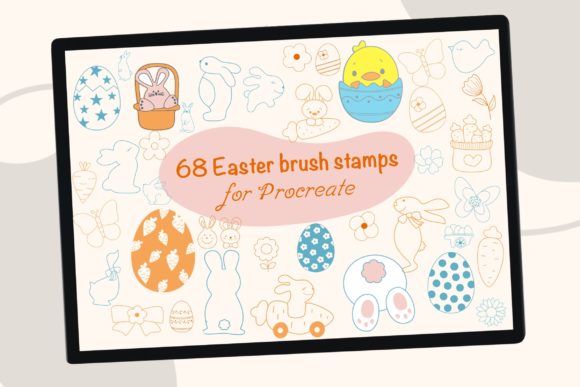
The core value proposition of the 68 Easter Procreate Brush Stamps lies in its specificity and ease of use. The set includes 68 distinct elements centered around Easter themes, with a notable focus on gnome characters. Gnomes have become a popular motif in modern seasonal decor, bridging the gap between traditional holiday symbols and contemporary whimsical aesthetics. Including these figures alongside standard Easter icons provides a versatile range of options for designers targeting current market trends.
Functionally, these are not painting brushes in the traditional sense. They are stamp brushes, meaning each tap of the Apple Pencil or finger places a complete graphic onto the canvas. This distinction is crucial for users expecting textured strokes. Instead, you receive ready-made shapes that can be manipulated using Procreate’s native transformation tools. You can scale, resize, rotate, and recolor each stamp independently. This flexibility allows for significant customization, enabling users to fill colors or add personal details to match their specific brand palette or artistic style.
Comparing Stamp Brushes to Traditional Illustration
When evaluating digital resources, it is helpful to compare stamp brushes against two primary alternatives: hand-drawing every element from scratch and using generic clip-art libraries.
Versus Hand-Drawing
Drawing complex elements like gnomes, intricate eggs, or floral wreaths by hand requires time, skill, and consistency. For a professional illustrator, creating a unique set of 68 cohesive elements could take days. The 68 Easter Procreate Brush Stamps compress this timeline into minutes. However, the trade-off is uniqueness. While you can modify colors and sizes, the base shape remains consistent. If your goal is to create a one-of-a-kind masterpiece where every line is original, hand-drawing remains superior. But for commercial projects requiring speed and volume, such as selling digital stickers or print-on-demand products, the efficiency gain is substantial.
Versus Generic Clip-Art
Many designers resort to downloading PNG clip-art files. While effective, this approach often leads to disjointed designs because the elements may come from different artists with varying styles and resolutions. Stamp brushes, by contrast, are created within the same ecosystem and style guide. The gnome easter elements in this set share a cohesive visual language, ensuring that a bunny stamp looks like it belongs in the same scene as a gnome stamp. Furthermore, because they are native Procreate brushes, they integrate seamlessly with layers and blending modes, offering a smoother workflow than importing multiple external image files.
Ideal Use Cases and Applications
Understanding where these brushes excel helps in assessing their value. The 68 Easter Procreate Brush Stamps are particularly well-suited for several specific types of digital projects:
- Digital Invitations and Greeting Cards: Speed is essential when creating customizable templates. These stamps allow designers to quickly assemble festive scenes without starting from a blank canvas.
- Sticker Sheets and Planner Decor: The ability to resize and recolor makes these elements perfect for creating digital sticker packs for apps like GoodNotes or Notability.
- Sublimation and Print-on-Demand: For entrepreneurs creating t-shirts, mugs, or tote bags, these brushes provide quick mock-up capabilities. You can test different color combinations rapidly before finalizing a design for production.
- Social Media Graphics: Content creators need fresh visuals daily. Using these stamps can help maintain a consistent aesthetic during the Easter season while reducing creation time.
If your work involves any of these areas, the investment in a specialized brush set can yield a high return on time saved. However, if you are primarily a fine artist focusing on realistic oil painting simulations or abstract expressionism, these decorative stamps may have limited utility in your daily practice.
Technical Considerations and Limitations
Before purchasing, it is important to acknowledge the technical constraints of this product. First and foremost, these brushes are designed exclusively for the Procreate app on iPad. They will not function in Photoshop, Procreate Pocket, or other desktop illustration software. This exclusivity is a significant factor for users who work across multiple platforms. If your workflow relies heavily on desktop applications, you may find the utility of this set restricted.
Additionally, while the brushes are easy to use, they do require a basic understanding of Procreate’s interface. The process involves downloading a ZIP file, unzipping it on the iPad, and importing the brush set. For tech-savvy users, this is a trivial task. However, beginners unfamiliar with file management on iOS might find the initial setup slightly daunting. The instructions provided—download, unzip, click to import—are straightforward, but user error can occur if the file is not properly extracted before attempting installation.
Another consideration is resolution. Stamp brushes are raster-based. While they can be scaled up, excessive enlargement may result in pixelation. It is advisable to test the largest size you anticipate needing to ensure the quality meets your printing or display standards. For most digital uses and standard print sizes, the quality is sufficient, but large-format banner designs may require higher-resolution vector alternatives.
Decision Factors: Is This Set Right for You?
Choosing the right design resources depends on your specific goals, skill level, and workflow. Here are key factors to consider when evaluating the 68 Easter Procreate Brush Stamps:
- Time vs. Originality: Are you willing to sacrifice some degree of unique line work for significant time savings? If yes, this set is a strong candidate.
- Platform Dependency: Do you work primarily on an iPad with Procreate? If you rely on desktop software, look for SVG or PNG bundles instead.
- Style Alignment: Does the whimsical, gnome-centric aesthetic match your brand or personal style? Review the preview images carefully to ensure the art direction aligns with your vision.
- Volume of Work: If you only create one Easter design per year, the cost-benefit ratio may be lower than for a designer producing seasonal content regularly.
It is also worth noting that these brushes are part of a larger ecosystem of digital assets offered by creators like Nine Sky Designs. Supporting independent designers often means receiving more curated, thoughtful collections compared to massive, impersonal stock libraries. The personalized support and specific thematic focus can enhance the user experience.
Final Thoughts on Integrating Seasonal Tools
The 68 Easter Procreate Brush Stamps represent a practical tool for modern digital creators who value efficiency without completely sacrificing creativity. They bridge the gap between tedious manual illustration and rigid clip-art usage, offering a flexible middle ground. By allowing users to tap, place, and customize elements like gnomes and Easter symbols, the set empowers designers to produce professional-looking work faster.
However, they are not a magic bullet. Success with these brushes depends on your ability to integrate them into a broader design strategy. Combining these stamps with hand-drawn backgrounds, custom typography, and unique color palettes will yield the best results. For those who fit the profile of an iPad-based creator looking to streamline their seasonal workflow, this brush set offers a logical and effective solution. Always weigh the convenience against your need for absolute originality, and ensure your technical setup supports the Procreate-exclusive format before making your decision.