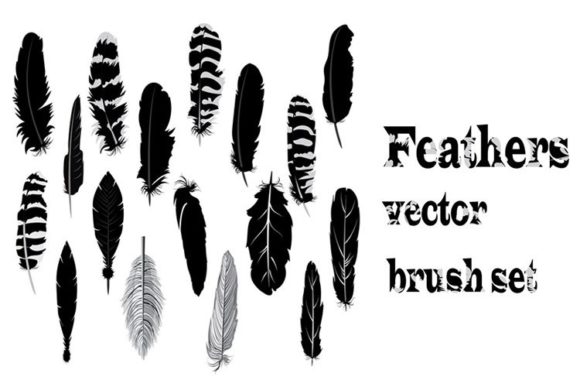
Feathers Brush Set for Illustrator
In the world of digital illustration, texture and organic detail often separate a flat design from a captivating piece of art. Whether you are crafting intricate branding materials, designing whimsical editorial illustrations, or adding subtle accents to web graphics, the quality of your brush strokes matters immensely. This is where the Feathers Brush Set for Adobe Illustrator becomes an indispensable tool in your creative arsenal. Rather than spending hours manually drawing individual barbs and shafts to achieve a realistic or stylized look, this collection offers a streamlined path to professional-grade results.
The core value of this resource lies in its versatility and ease of integration. Delivered as a convenient Zip file containing one EPS and one AI file, the set is fully editable within Adobe Illustrator. This means you are not locked into rigid, pre-defined shapes. Instead, you have complete control over color, scale, and opacity, allowing the brushes to adapt seamlessly to your specific project requirements. For professionals who value efficiency without compromising on artistic integrity, understanding how to leverage such specialized assets can significantly enhance workflow productivity.
Streamlining the Creative Workflow
Time is perhaps the most valuable commodity for freelancers, agency designers, and small business owners. Creating detailed feather textures from scratch requires a high level of technical skill and a significant time investment. By utilizing the Decorative feathers collection of brushes for Adobe Illustrator, you bypass the tedious initial sketching phase. This allows you to focus more on composition, color theory, and overall narrative rather than getting bogged down in repetitive vector detailing.
Consider a scenario where you are designing a logo for a boutique wellness brand that emphasizes lightness and natural beauty. Hand-drawing a feather icon that looks balanced and symmetrical can be challenging. With this brush set, you can apply a stroke that instantly mimics the delicate structure of a feather. Because the files are fully editable, you can tweak the anchor points to perfect the curvature, ensuring the final logo feels bespoke rather than generic. This balance between speed and customization is crucial for meeting tight deadlines while maintaining high standards.
Enhancing Visual Communication and Aesthetics
Visual elements serve as a universal language, often communicating emotions faster than text. Feathers are symbolic of freedom, lightness, travel, and elegance. Incorporating these motifs into your designs can subtly reinforce these themes. The Feathers Brush Set for Adobe Illustrator provides a range of styles, from realistic plumes to more abstract, decorative interpretations. This variety ensures that you can find the right tone for your audience, whether they are corporate clients seeking sophistication or younger demographics looking for trendy, bohemian aesthetics.
For educators and content creators, these brushes can be particularly useful in developing engaging visual aids. Imagine creating an infographic about bird migration or the history of writing instruments. Using consistent, high-quality feather graphics helps maintain visual coherence throughout the document. The ability to edit the AI files means you can simplify complex feathers for smaller icons or add intricate details for large-format prints, ensuring clarity at every scale.
Technical Flexibility and Editability
One of the standout features of this collection is its technical foundation. Many free or low-quality brush sets offer raster images or non-editable vectors, which limit their utility in professional print and digital media. In contrast, this set includes both EPS and AI formats. The EPS format ensures compatibility with older versions of Illustrator and other vector-based software, while the native AI file allows for immediate, deep editing within the Adobe ecosystem.
Being "fully editable" is not just a marketing term; it is a practical necessity. You may need to change the color profile from RGB to CMYK for print production, adjust the stroke weight to match a specific brand guideline, or modify the shape to fit a unique layout constraint. With this set, you have access to the underlying vector paths. This level of control empowers marketers and publishers to maintain brand consistency across various platforms, from social media posts to printed brochures.
Ideal Use Cases for Designers and Entrepreneurs
Who benefits most from integrating the Decorative feathers collection of brushes for Adobe Illustrator into their toolkit? The answer spans a wide range of creative professionals:
- Freelance Illustrators: Can quickly add texture and depth to character designs or background elements, reducing billable hours spent on manual detailing.
- Small Business Owners: Those managing their own marketing can create polished, professional-looking social media graphics without needing advanced drawing skills.
- Publishers and Editors: Can use feather motifs as section dividers, chapter headers, or decorative borders in books and magazines, adding a touch of elegance to the layout.
- Web Designers: Can incorporate lightweight SVG-compatible feather elements into website backgrounds or hero sections to create a soft, inviting user experience.
For entrepreneurs launching a product line related to nature, yoga, or luxury goods, these brushes can help in creating cohesive packaging designs. The ability to customize the brushes means you can align the feather style with your brand’s unique voice, whether it is minimalist and modern or ornate and vintage.
Considerations for Best Results
While the Feathers Brush Set for Adobe Illustrator offers significant advantages, it is important to approach its use with a designer’s eye. Pre-made assets should enhance your work, not define it entirely. To avoid a "cookie-cutter" look, consider combining different brushes from the set, adjusting their transparency, and layering them with other textures. Experimentation is key. Try rotating the brushes, flipping them horizontally, or changing the color gradients to create unique compositions.
Additionally, always check the licensing terms if you are using these assets for commercial client work. While most such sets are designed for commercial use, verifying this ensures you protect yourself and your clients from potential intellectual property issues. Furthermore, consider the context of your design. A highly detailed, realistic feather might overwhelm a minimalist logo, whereas a simplified, stylized version could be perfect. The editability of the AI files allows you to make these necessary adjustments, but it requires a basic understanding of vector manipulation.
Final Thoughts on Digital Asset Integration
Incorporating specialized tools like the Decorative feathers collection of brushes for Adobe Illustrator is a smart strategy for any creative professional looking to optimize their process. It represents a shift from working harder to working smarter. By leveraging high-quality, editable resources, you free up mental energy for higher-level creative decisions. Whether you are a seasoned illustrator or a hobbyist exploring digital art, this set provides a solid foundation for creating beautiful, meaningful designs. Remember, the tool is only as good as the vision behind it, so use these brushes as a starting point for your own unique artistic expression.