Mastering Digital Environments with Ye Olde Landscape Brushset for Procreate
Digital illustration has evolved rapidly, moving from simple vector lines to complex, textured environments that mimic the depth and atmosphere of traditional media. For artists working on iPads, the gap between a flat digital sketch and a breathing, living landscape often comes down to texture and atmospheric perspective. This is where specialized tools become indispensable. The Ye Olde Landscape Brushset for Procreate emerges as a robust solution for illustrators, concept artists, and hobbyists who struggle to capture the organic chaos of nature using standard software defaults.
Landscape painting is notoriously difficult. It requires a mastery of light, weather, and biological forms. A single tree is not just a green blob; it is a collection of bark textures, leaf clusters, and shadowed undergrowth. A sky is not merely blue; it is a gradient of humidity, cloud density, and atmospheric haze. Creating these elements from scratch can be time-consuming and technically demanding. By integrating a dedicated toolkit like the Ye Olde Landscape Brushset for Procreate, artists can streamline their workflow, focusing more on composition and mood rather than getting bogged down in repetitive texturing tasks.
The Power of Specialized Atmospheric Tools
One of the most challenging aspects of landscape art is establishing atmosphere. Without proper atmospheric perspective, a scene can look flat, regardless of how detailed the foreground objects are. This brush set addresses this critical need with a suite of cloudy sky and fog brushes. These are not static stamps but dynamic tools designed to interact with the canvas in a way that mimics the diffusion of light through particles.
When you apply a fog brush from this collection, it doesn't just lay down a solid color. It creates a soft, translucent layer that allows underlying details to peek through, creating a sense of depth and distance. This is essential for creating misty mornings, humid jungles, or distant mountain ranges that fade into the horizon. The ability to quickly block in these atmospheric conditions allows artists to establish the mood of a piece within minutes. Whether you are aiming for a gloomy, gothic aesthetic or a bright, airy pastoral scene, controlling the density and spread of your atmospheric elements is key. The brushes included here offer varying levels of opacity and scatter, giving you granular control over how thick or thin the air feels in your painting.
Organic Textures: From Bark to Blossoms
Beyond the sky, the terrestrial elements of a landscape require equally nuanced handling. Trees are the backbone of most outdoor scenes, yet they are often the weakest link in amateur digital paintings. The Ye Olde Landscape Brushset for Procreate includes specific brushes for tree bark, offering a range of textures from smooth young saplings to rugged, ancient oaks. These brushes utilize pressure sensitivity to vary the thickness and darkness of the bark lines, allowing for a natural, hand-drawn feel that avoids the robotic repetition common in basic pattern stamps.
Similarly, foliage can make or break a landscape. Painting individual leaves is impractical for large-scale works, while using a single generic "leaf" stamp often results in a unnatural, tiled appearance. This set provides flower and leaf tree brushes that are designed with randomization in mind. When you stroke across the canvas, the brush varies the angle, size, and color saturation of the foliage clusters. This variation is crucial for achieving a realistic look. It allows you to build up layers of canopy, starting with darker, shadowed base layers and finishing with lighter, sun-hit highlights. The result is a lush, vibrant forest that feels alive rather than constructed.
Compatibility and Workflow Integration
It is vital to note that these brushes are only compatible with the Procreate app. This exclusivity is both a limitation and a strength. Procreate’s engine is uniquely suited for handling complex brush behaviors, including grain, shape dynamics, and wet mix settings. The developers of the Ye Olde Landscape Brushset for Procreate have leveraged these specific features to create brushes that behave predictably and responsively within the iOS ecosystem. If you are an artist who relies on desktop software like Photoshop or Clip Studio Paint, this tool will not function for you. However, for the growing community of mobile-first creators, this optimization ensures a seamless experience.
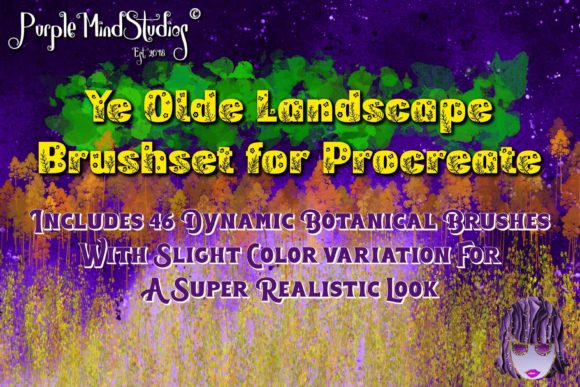
Integrating this brush set into your existing workflow is straightforward. Because Procreate supports custom brush imports, installing the set takes moments. Once installed, the 46 original dynamic landscaping brushes are organized for easy access. Artists typically keep their primary sketching brushes separate from their texturing tools. By dedicating a specific brush group to landscapes, you can switch between broad atmospheric strokes and detailed bark textures without cluttering your main palette. This organization promotes a faster, more intuitive creative process, allowing you to stay in the "flow state" longer.
Practical Applications for Modern Creators
Who benefits most from this toolkit? The applications are diverse. Concept artists working in game development or film pre-production often need to generate environment ideas quickly. The speed at which one can block in a forest scene or a stormy sky using these presets is invaluable for pitching ideas. Instead of spending hours rendering every leaf, an artist can use the flower and leaf tree brushes to suggest density and form, focusing their manual effort on focal points and lighting.
Illustrators of children’s books also find immense value in such tools. Storybook landscapes often require a whimsical yet coherent style. The dynamic nature of these brushes allows for a painterly look that retains charm without sacrificing clarity. Furthermore, hobbyists who want to improve their digital painting skills can use these brushes as learning aids. By observing how the fog brushes blend with background colors or how the bark brushes respond to pressure changes, users can gain insights into traditional painting techniques that they can then replicate manually if desired.
Maximizing the Potential of Your Brushes
To get the most out of the Ye Olde Landscape Brushset for Procreate, it is important to understand that these are tools, not magic wands. While they accelerate the process, artistic judgment is still required. Here are some practical tips for leveraging these 46 brushes effectively:
- Layering is Key: Do not rely on a single pass. Use the fog brushes on multiple layers with different opacities to create deep, volumetric atmosphere. Place distant trees on a separate layer with reduced saturation to enhance atmospheric perspective.
- Color Variation: Even the best leaf brush will look flat if used with a single color. Sample colors from your reference images frequently. Use the color picker to pull shadows and highlights directly from your canvas to maintain harmony.
- Combine with Standard Tools: Use the specialized bark brushes for texture, but refine the overall shape of the tree with a standard hard round brush. This combination prevents the artwork from looking overly reliant on presets.
- Experiment with Blend Modes: Try setting your cloud or fog layers to "Overlay" or "Soft Light" to let the underlying landscape colors influence the atmosphere. This creates a more cohesive and integrated look.
Another consideration is resolution. Procreate handles high-resolution canvases well, but complex brushes can sometimes lag on older iPad models if the canvas size is excessive. It is advisable to start with a moderate resolution for sketching and blocking in shapes using the Ye Olde Landscape Brushset for Procreate, and only increase the canvas size for final detailing if necessary. This ensures a smooth drawing experience, particularly when using the more complex, multi-stamp foliage brushes.
Why Choose a Dedicated Landscape Set?
In an era where thousands of free brushes are available online, why invest in a curated set? The answer lies in consistency and quality control. Free brushes often lack optimization, leading to unexpected behavior or poor performance. They may not be tested across different iPad models or Procreate updates. A professional set like this one is designed with cohesion in mind. The 46 brushes work together harmoniously. The scale of the leaves matches the scale of the bark textures; the density of the clouds complements the softness of the fog. This internal consistency saves artists from the frustration of mismatched tools that require constant adjustment.
Moreover, the specific focus on "Ye Olde" aesthetics suggests a tilt towards classical, perhaps slightly rustic or romanticized landscape styles. This is ideal for fantasy illustrations, historical reconstructions, or any project requiring a touch of timeless beauty. The brushes are not just functional; they carry a stylistic intent that can help define the visual identity of your artwork.
Ultimately, the decision to adopt new digital tools should be driven by your specific needs. If you find yourself struggling with the monotony of painting nature, or if your landscapes lack the atmospheric depth you desire, this brush set offers a tangible solution. It bridges the gap between technical skill and artistic vision, allowing you to express your creativity with greater ease and confidence. By mastering these tools, you unlock the ability to create immersive worlds that captivate viewers, proving that the right digital instruments can indeed elevate your art to new heights.