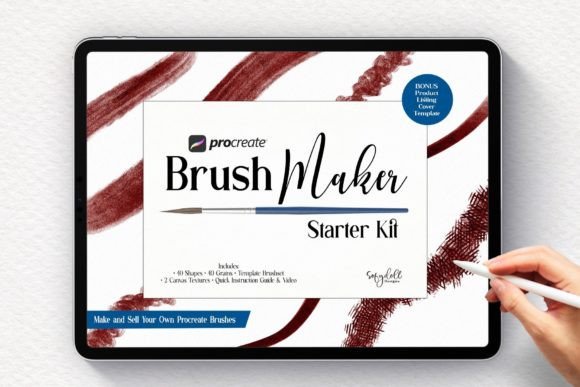
Procreate Brushmaker Starter Kit: A Practical Guide to Custom Brush Creation
If you have ever stared at the default brush library in Procreate and wished for a specific texture that just wasn’t there, you are not alone. Many digital artists reach a point where standard tools feel limiting. You might want a charcoal stroke that crumbles realistically or a watercolor wash that bleeds with organic unpredictability. This is exactly where the Procreate Brushmaker Starter Kit becomes an invaluable resource. It bridges the gap between using existing tools and creating your own, removing the technical intimidation that often stops creators from experimenting with custom brush engines.
This kit is not just a collection of assets; it is a workflow solution. Whether you are a hobbyist looking to personalize your journaling experience or a professional illustrator aiming to develop a unique signature style for client work, understanding how to build brushes is a high-value skill. The starter kit provides the raw materials—shapes, grains, and templates—that allow you to focus on the creative aspect of brush design rather than getting bogged down in the technical setup from scratch.
Why Start with a Template Instead of From Scratch?
Creating a brush in Procreate involves manipulating dozens of settings, from shape dynamics to rendering options. For beginners, this can feel overwhelming. The primary benefit of the Procreate Brushmaker Starter Kit is that it offers a pre-made template brush set. Think of this as a scaffold. Instead of building a house from the foundation up, you are given a solid structure that you can modify. This approach significantly reduces the learning curve.
Experienced brush makers will also find utility here. Even if you know your way around the brush studio, starting with a clean, optimized template saves time. It ensures that your base settings are neutral and ready for customization, preventing common issues like laggy strokes or inconsistent opacity. The kit includes 40 shapes in PNG format and 40 seamless texture grains in JPEG, all at 300 dpi. These are high-resolution assets, which means your brushes will maintain clarity even when used on large canvases for print or high-definition displays.
Real-World Applications for Different Creators
The versatility of this kit lies in how different users can apply these resources to their specific needs. Let’s look at a few realistic scenarios where this toolset shines.
For the Freelance Illustrator Seeking Brand Consistency
Imagine you are a freelance artist who works with multiple clients. One client loves rough, sketchy lines, while another prefers smooth, ink-like precision. Using the same standard brushes for both can make your portfolio look generic. By using the Procreate Brushmaker Starter Kit, you can create two distinct brush sets tailored to each client’s aesthetic. You might use one of the included grain textures to add a subtle paper noise to your inking brush, giving it a traditional feel that stands out in a digital sea. This level of customization helps you deliver a unique product that feels bespoke, potentially justifying higher rates.
For the Digital Educator and Course Creator
Educators who teach digital art often struggle to explain how certain effects are achieved. If you are creating a course on digital painting, having your own custom brushes can be a major selling point. You can use the kit to create specific brushes that demonstrate particular techniques, such as a "wet-on-wet" watercolor brush. Furthermore, the kit includes a bonus ‘product listing cover template’ in Procreate file format. If you decide to sell your course or give away free brushes as lead magnets, this template guides you in creating professional-looking presentation images. It saves you from hiring a graphic designer just to market your educational content.
For the Hobbyist and Journal Enthusiast
Digital journaling has exploded in popularity, but many users feel restricted by the clean, vector-like lines of default pens. With the 40 shapes and grains provided, you can craft brushes that mimic the imperfection of real-world tools. You might combine a scattered shape with a rough grain to create a stamp brush for decorating your daily logs. The inclusion of two canvas textures allows you to test these brushes in a realistic environment immediately. You can see how your new "pencil" interacts with a textured paper background, ensuring it looks authentic before you commit to using it in your final artwork.
What Is Inside the Kit?
To get the most out of this resource, it helps to understand exactly what you are working with. The Procreate Brushmaker Starter Kit is comprehensive yet focused. Here is a breakdown of the core components:
- 40 Shape Files (PNG, 300 dpi): These define the basic outline of your brush tip. They range from simple circles to complex organic forms, providing a diverse starting point for everything from calligraphy to foliage.
- 40 Seamless Texture Grains (JPEG, 300 dpi): Grains add surface detail to your strokes. These seamless textures ensure that when you draw long lines, the pattern repeats naturally without visible seams or breaks.
- Pre-Made Template Brushes: These are fully functional Procreate brushes that serve as your base. You can duplicate them and tweak settings to see immediate results.
- 2 Canvas Textures: Essential for testing. They provide a background context so you can evaluate how your brush interacts with surface tooth.
- Quick Instruction Guide and Short Video: These resources walk you through the import process and basic customization, ensuring you are not left guessing how to install the files.
- Bonus Product Listing Cover Template: A Procreate file designed to help you create marketing visuals if you choose to sell your creations.
Technical Requirements and Setup
Before purchasing or downloading, ensure you have the necessary hardware and software. This kit is designed specifically for the iPad ecosystem. You will need:
- An iPad compatible with the latest version of Procreate.
- The Procreate app, available via the App Store.
- An Apple Pencil or a compatible stylus for precise control during testing and creation.
It is important to note that this kit does not work on desktop versions of Photoshop or other drawing software. It is optimized for the Procreate brush engine. However, the PNG and JPEG assets included could theoretically be used in other programs if you are experienced in those platforms, but the template brushes and instructions are strictly for Procreate users.
Considerations Before You Begin
While the Procreate Brushmaker Starter Kit simplifies the process, creating great brushes still requires experimentation. Do not expect to create a masterpiece brush in five minutes. The value comes from tweaking. You might need to adjust the size jitter, opacity pressure, or flow settings to get the exact feel you want. The kit gives you the ingredients, but you are the chef.
Also, consider your end goal. If you plan to sell your brushes, pay attention to the licensing terms of the shapes and grains provided. While the kit allows you to create and sell your own brushes, it is always wise to double-check whether you can resell the raw assets themselves (usually, you cannot). The focus should be on the unique combination of settings and modifications you apply to these base materials.
Finally, take advantage of the video guide. Watching someone else navigate the brush studio can clarify concepts that text instructions might miss. Seeing how a change in the "Grain" tab affects the stroke in real-time is far more effective than reading about it. This visual learning component is crucial for mastering the nuances of digital brush dynamics.
Making the Most of Your Investment
The Procreate Brushmaker Starter Kit is more than a download; it is an invitation to deepen your understanding of digital art tools. By providing high-quality shapes, seamless grains, and a structured template, it removes the barriers to entry for custom brush creation. Whether you are looking to streamline your professional workflow, enhance your teaching materials, or simply add more personality to your digital journals, this kit offers a practical, hands-on path forward. Start with the templates, experiment with the textures, and soon you will find yourself creating tools that are uniquely yours.