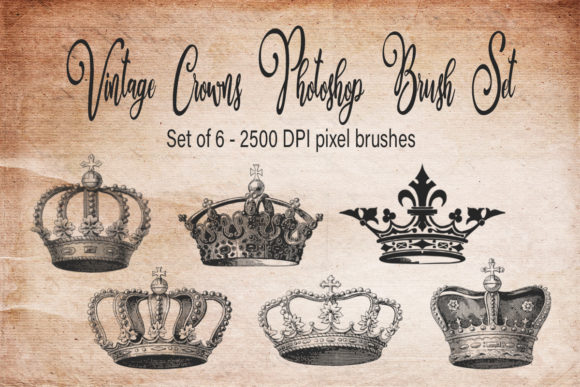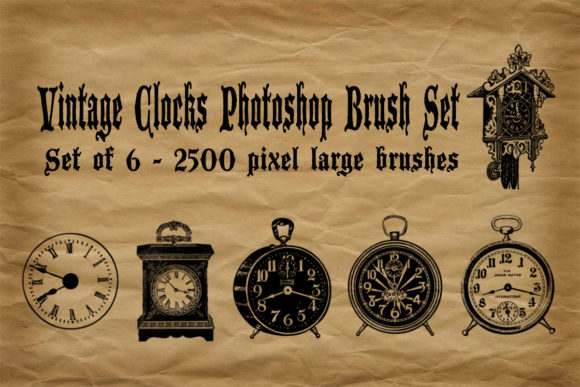
Vintage Clocks Photoshop Brush Set: Elevate Your Retro Designs
In the world of digital design, texture and authenticity are often the missing ingredients that separate a generic composition from a captivating piece of art. For designers, crafters, and retro enthusiasts, finding high-quality assets that evoke a specific era without requiring hours of manual illustration can be a significant challenge. This is where the Vintage Clocks Photoshop Brush Set becomes an invaluable resource. By integrating these specialized tools into your workflow, you can instantly inject nostalgia, character, and historical charm into your projects, streamlining the creative process while maintaining professional quality.
The Challenge of Authentic Retro Design
Creating vintage-themed graphics often involves a tedious search for public domain images or the time-consuming task of drawing intricate mechanical details from scratch. Many free resources available online suffer from low resolution, poor transparency, or inconsistent lighting, making them difficult to blend seamlessly into modern compositions. Furthermore, vector clocks often lack the organic imperfections that give antique items their soul. Designers aiming for a true mid-century or Victorian aesthetic need assets that feel lived-in and authentic, not sterile and digital.
The goal for most creatives is efficiency without sacrificing quality. You want to focus on the overall composition, color grading, and storytelling of your piece, rather than getting bogged down in the minutiae of rendering clock gears, hands, and faces. The Vintage Clocks Photoshop Brush Set addresses this need by providing pre-rendered, high-resolution stamps that are ready to use, allowing you to bypass the initial drafting phase and move straight to artistic refinement.
What Is Included in the Set?
This curated collection is designed specifically for those who appreciate the aesthetics of a bygone era. The set includes six distinct brushes, each capturing the unique personality of different timekeeping devices. You will find classic old-fashioned wall clocks, traditional alarm clocks with twin bells, and even a whimsical cuckoo clock. These are not simple icons; they are detailed representations that retain the structural integrity and visual weight of real objects.
One of the standout features of this Vintage Clocks Photoshop Brush Set is the resolution. Each brush is rendered at 2500 pixels, ensuring that they remain crisp and detailed even when scaled up for large-format prints or high-density digital displays. This level of detail is crucial for professional work, where pixelation can ruin the illusion of realism. Upon purchase or download, you receive a single .ABR file, which is the standard format for Adobe Photoshop brushes. This makes installation straightforward and ensures compatibility with most versions of the software.
Practical Applications for Designers and Crafters
The versatility of these brushes extends far beyond simple clock illustrations. Here are several practical ways to integrate this Vintage Clocks Photoshop Brush Set into your creative workflow:
- Digital Scrapbooking and Paper Crafts: For those who design digital papers or printable scrapbook elements, these clocks serve as perfect focal points. They can be layered over textured backgrounds, aged paper textures, or floral patterns to create cohesive vintage themes.
- Web and Social Media Graphics: Create eye-catching headers or post images for blogs focusing on history, antiques, or time management. The retro aesthetic stands out in a feed dominated by minimalist modern design.
- Product Design and Mockups: If you are designing packaging for artisanal goods, such as coffee blends, handmade soaps, or boutique teas, these clock motifs can add a sense of heritage and trustworthiness to the brand identity.
- Textile and Pattern Creation: Use the brushes to create repeating patterns for fabric design. By rotating and arranging the different clock types, you can generate unique, seamless tiles that work well for home decor items like pillowcases or curtains.
Enhancing Realism Through Layering and Blending
To truly maximize the potential of the Vintage Clocks Photoshop Brush Set, it is essential to understand how to blend these elements into your existing artwork. Simply stamping a black clock onto a white background rarely yields a professional result. Instead, consider using blending modes such as "Multiply" for light backgrounds or "Screen" for dark ones. This allows the underlying textures of your canvas to show through the clock face, creating a unified look.
Additionally, because these are raster brushes, you have the flexibility to adjust their color hue and saturation to match your project's palette. A sepia-toned clock might suit a Victorian theme, while a desaturated, cool-toned clock could fit a mid-century modern industrial vibe. Adding subtle drop shadows or outer glows can also help anchor the clocks in the scene, giving them depth and preventing them from looking like flat stickers.
Tailoring the Approach to Your Skill Level
Different users will approach the Vintage Clocks Photoshop Brush Set in varied ways, depending on their experience and goals. Beginners may find these brushes to be an excellent entry point into digital collage. They provide a safe, high-quality foundation that guarantees a certain level of visual appeal, allowing new users to experiment with composition and layout without worrying about drawing skills.
Intermediate and advanced designers, on the other hand, will likely use these brushes as components in more complex manipulations. They might mask out parts of the clock, combine elements from different brushes, or use the clock faces as containers for other images. For professionals, the high resolution of 2500 pixels is critical, as it allows for non-destructive editing and scaling without loss of fidelity. This adaptability makes the set useful for everyone from hobbyists making greeting cards to agencies developing branding materials.
Why Choose This Specific Brush Set?
There are countless clock images available on stock photo sites, but brushes offer a distinct advantage: speed and integration. When you use the Vintage Clocks Photoshop Brush Set, you are working directly within your native environment. There is no need to import external PNG files, manage multiple layers for each asset, or worry about inconsistent resolutions. Everything is contained within one easy-to-access tool panel.
Moreover, the curation of this set ensures thematic consistency. Mixing random clock images from different sources can result in a disjointed look due to varying perspectives, lighting directions, and artistic styles. This set provides a harmonious visual language, ensuring that all six clocks complement each other when used in the same project. This coherence is vital for creating polished, professional-grade designs.
Getting Started with Your Vintage Creations
Implementing these tools into your routine is simple. After installing the .ABR file, select the Brush Tool in Photoshop and locate the new set in your brush library. Start by experimenting with size dynamics and opacity jitter to add variation to your strokes. Try combining the cuckoo clock with rustic wood textures, or pair the alarm clock with typewriter fonts for a cohesive retro poster.
Remember that the best designs often come from experimentation. Don’t be afraid to distort, rotate, or recolor the brushes to fit your specific vision. The Vintage Clocks Photoshop Brush Set is not just a collection of images; it is a toolkit for storytelling. Whether you are evoking the urgency of time, the comfort of nostalgia, or the beauty of mechanical engineering, these brushes provide the raw material you need to bring your ideas to life.
In conclusion, for anyone looking to enhance their digital art with authentic retro elements, this brush set offers a practical, high-quality solution. It saves time, ensures visual consistency, and opens up new creative possibilities for designers, crafters, and retro lovers alike. By leveraging these 2500-pixel high-resolution brushes, you can create stunning, timeless graphics that resonate with audiences who appreciate the charm of the past.