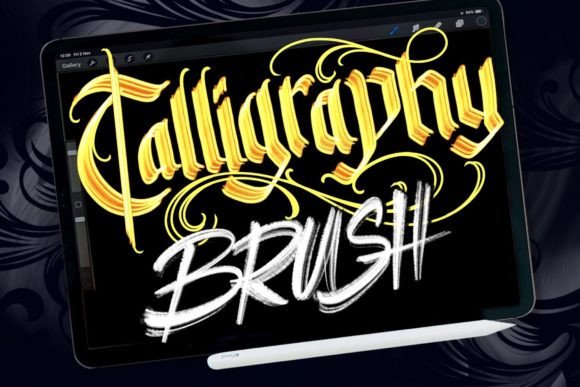
Mastering Digital Lettering with the Calligraphy Light Brush
The transition from traditional ink and paper to digital canvases has transformed the landscape of graphic design and illustration. For artists who have spent years mastering the tactile nuances of analog media, this shift can often feel like a compromise. However, recent advancements in hardware and software have bridged this gap, allowing creators to retain the organic soul of hand-lettering while enjoying the flexibility of digital workflows. At the heart of this evolution is the demand for specialized tools that mimic real-world physics. Among these, the Calligraphy Light Brush has emerged as a pivotal resource for designers seeking authenticity in their digital projects.
We have been working with lettering for a long time, observing the subtle shifts in how artists approach their craft. Recently, we noticed a significant surge in demand for specific materials tailored for those who wish to work with lettering digitally. As lettering artists who focus almost exclusively on analog artwork, we understand the hesitation many feel when moving to screens. The loss of friction, the uniformity of standard digital lines, and the lack of texture can strip a piece of its character. To address this, we dedicated countless hours to creating handmade resources in an analog style, specifically optimized for use in Procreate on the iPad Pro with the Apple Pencil.
Bridging the Analog-Digital Divide
The core challenge in digital lettering is replicating the unpredictability of physical media. When you write with a brush pen on textured paper, the ink behaves differently depending on the speed of your stroke, the pressure applied, and the grain of the surface. Standard digital brushes often fail to capture these micro-variations, resulting in work that looks sterile or overly processed. Our extensive research into what works and what does not led to the creation of our own extensive brush sets, designed to solve this exact problem.
The Calligraphy Light Brush is not merely a tool; it is a simulation of a physical experience. By studying the behavior of light brush pens, we engineered a digital counterpart that responds dynamically to the Apple Pencil’s tilt and pressure sensitivity. This allows for a perfect possibility of creation, where every upstroke and downstroke feels intentional and natural. The brush captures the delicate tapering of thin lines and the bold saturation of thick strokes, mirroring the behavior of high-quality analog tools.
Why Texture and Imperfection Matter
In the world of design, perfection is often the enemy of engagement. Human eyes are drawn to irregularities because they signal humanity and effort. A perfectly smooth vector line can feel cold, whereas a stroke with slight texture invites the viewer in. The Calligraphy Light Brush introduces these necessary imperfections without requiring post-production editing. This feature is particularly valuable for creators who want to maintain an authentic aesthetic without sacrificing the efficiency of digital layers and undo buttons.
For educators and researchers studying visual communication, this blend of analog warmth and digital precision offers a fascinating case study in modern craftsmanship. It demonstrates how technology can enhance rather than replace traditional skills. Hobbyists and professionals alike benefit from this hybrid approach, as it lowers the barrier to entry for complex lettering styles while maintaining a high ceiling for artistic expression.
Practical Applications for Creators and Businesses
The versatility of the Calligraphy Light Brush extends far beyond simple practice sheets. Its ability to produce realistic, hand-drawn aesthetics makes it an invaluable asset across various industries. Whether you are a business owner looking to create unique branding materials or a freelancer designing custom invitations, this tool adapts to your needs.
- Brand Identity and Logos: Companies seeking a boutique or artisanal feel can utilize the brush to create custom logotypes that stand out against generic typography. The organic nature of the strokes conveys trust and approachability.
- Social Media Content: In an era where scroll-stopping visuals are crucial, handwritten elements add a personal touch to digital posts. The brush allows for quick creation of quotes, announcements, and promotional graphics that feel personal and engaging.
- Packaging Design: Product labels often benefit from the elegance of calligraphy. Using the Calligraphy Light Brush, designers can draft concepts rapidly, iterate on layouts, and finalize designs that look hand-painted, adding perceived value to the product.
- Educational Materials: Teachers and content creators can use the brush to highlight key points in worksheets or presentations, making learning materials more visually appealing and easier to digest.
Optimizing Your Workflow in Procreate
To fully leverage the potential of the Calligraphy Light Brush, understanding its interaction with the iPad Pro and Apple Pencil is essential. We have studied what works and what does not to ensure our brush sets integrate seamlessly into your existing workflow. Here are some considerations for maximizing your creative output.
First, consider the canvas resolution. While digital files are scalable, starting with a high-resolution canvas ensures that the texture details embedded in the brush remain crisp, even when zoomed in. Second, experiment with pressure curves. Every artist holds their stylus differently. Adjusting the pressure sensitivity settings in Procreate can help you find the sweet spot where the Calligraphy Light Brush responds most naturally to your hand movements.
Furthermore, layer management plays a crucial role. Because the brush mimics real ink, overlapping strokes can create realistic darkening effects, similar to how ink pools on paper. Utilizing multiply blending modes on separate layers can enhance this effect, allowing for deeper shadows and richer contrasts without muddying the colors. This technique is particularly effective for creating depth in posters and flyers.
From Sketch to Final Polish
The journey from concept to completion is streamlined when using tools that feel intuitive. With the Calligraphy Light Brush, the initial sketching phase becomes more fluid. Artists can lay down foundational structures with confidence, knowing that the final strokes will retain their elegance. This reduces the time spent on cleanup and correction, allowing more focus on composition and balance.
For those transitioning from traditional media, the psychological benefit cannot be overstated. The familiarity of the brush’s behavior reduces the cognitive load associated with learning new software. Instead of fighting against the tool, you can focus on the art itself. This ease of use makes it easier for you to be creative in making digital works with analog touches that look very real.
Designing Without Limitations
One of the most significant advantages of digital lettering is the freedom to experiment without the cost of materials. With physical supplies, every mistake means wasted paper and ink. Digitally, the Calligraphy Light Brush allows for endless iteration. You can test different color palettes, adjust spacing, and resize elements instantly. This flexibility encourages risk-taking and innovation, leading to more dynamic and original designs.
Whether you are designing anything from wedding invitations to corporate reports, the brush imposes no limitations on your vision. It supports a wide range of styles, from loose and expressive scripts to structured and formal calligraphy. This adaptability ensures that the tool grows with you, serving both beginner hobbyists and seasoned professionals.
In conclusion, the integration of the Calligraphy Light Brush into your digital toolkit represents a harmonious blend of tradition and technology. By prioritizing the authentic feel of analog artwork while leveraging the power of the iPad Pro and Apple Pencil, we have created a resource that empowers creators to produce work that is both efficient and emotionally resonant. As the demand for genuine, human-centric design continues to rise, tools that facilitate this connection will remain indispensable. Embrace the possibilities, explore the textures, and let your creativity flow without boundaries.